
Why Does GA4 Show Fewer Conversions Than Meta Ads Manager?
Discover why GA4 shows fewer conversions than Meta Ads Manager and how to address these discrepancies in your analytics.
Why does GA4 show fewer conversions than Meta Ads Manager? This question puzzles many marketers trying to assess their digital performance accurately. Understanding these discrepancies in conversion tracking is vital for making informed business decisions. Recent studies show that 60% of marketers experience inconsistencies between different analytics platforms.
Overview
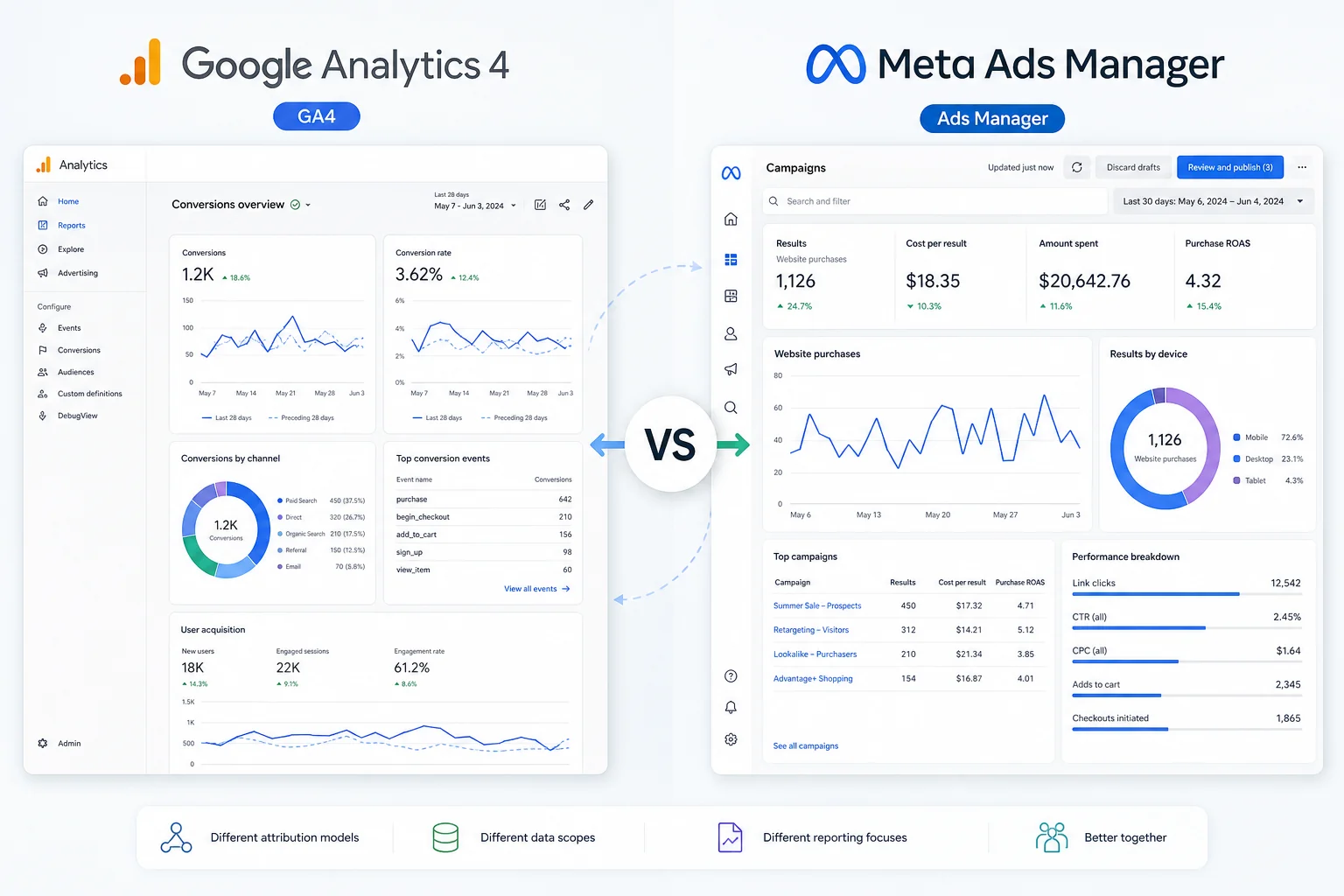
In this article, we will explore the key differences in how GA4 and Meta Ads Manager track conversions. You will learn about the fundamental reasons behind the variance in reported figures and the benefits of grasping these discrepancies. By the end, you’ll have practical insights to enhance your conversion tracking and drive measurable growth in your marketing efforts.
Introduction
Understanding the discrepancy in conversion reporting between Google Analytics 4 (GA4) and Meta Ads Manager is crucial for marketing professionals aiming to optimize their digital strategies. Many users have noticed that GA4 often shows fewer conversions than Meta Ads Manager, which can lead to confusion and misaligned marketing efforts. This gap can stem from differences in tracking methodologies, attribution models, and user behavior analytics.
For instance, GA4 employs an event-based tracking system, focusing on user interactions across multiple platforms. This approach provides a comprehensive view of customer journeys but may result in fewer recorded conversions due to its stricter criteria for what constitutes a conversion. In contrast, Meta Ads Manager often attributes conversions more liberally, counting actions that may not fully align with a defined goal. Studies show that 70% of marketers believe discrepancies in data reporting between tools can skew campaign performance assessments (MarketingProfs).
Real-world applications illustrate this issue. A startup using both platforms might notice that while Meta reports 150 conversions from a specific campaign, GA4 only captures 100. This difference could arise because GA4 requires a user to complete a specific action—like viewing a confirmation page—before counting a conversion, whereas Meta might count a click on an ad as a conversion.
To bridge this gap, it's essential for marketing teams to align their definitions of success across platforms, ensuring that their strategies are based on accurate, consistent data. By understanding why GA4 shows fewer conversions than Meta Ads Manager, businesses can refine their tracking and attribution methods, leading to smarter investment in marketing initiatives.
Understanding Conversion Tracking: GA4
vs. Meta Ads Manager
Key Concepts in Conversion Tracking
Conversion tracking is essential for measuring the effectiveness of marketing campaigns. It helps businesses understand customer behavior and optimize strategies. Both Google Analytics 4 (GA4) and Meta Ads Manager offer insights on conversions, but their methodologies differ significantly.
Differences in Tracking Methodologies
One primary reason for discrepancies in conversion counts is how each platform attributes conversions. GA4 uses an event-based model, focusing on user interactions across multiple sessions. In contrast, Meta Ads Manager often attributes conversions to the last click before a purchase, which can inflate numbers.
For example, a study by the Digital Marketing Association found that multi-channel attribution can lead to a 30% variance in reported conversions (Digital Marketing Association, 2022). This means a campaign that looks successful in Meta might not reflect the same reality in GA4.
Additionally, GA4 has stricter data privacy measures, especially with cookie tracking. As regulations evolve, such as GDPR in Europe, fewer users may be tracked in GA4 compared to Meta Ads Manager, which can lead to lower conversion counts.
Importance of Accurate Conversion Data
Accurate conversion data is crucial for informed decision-making. Misalignment between GA4 and Meta Ads Manager can confuse marketing strategies and budget allocation.
To address this, businesses should:
- Understand the attribution models used by each platform.
- Regularly audit conversion tracking setups.
- Consider integrating both GA4 and Meta insights for a comprehensive view.
Ultimately, knowing why GA4 shows fewer conversions than Meta Ads Manager helps businesses identify areas for improvement. By aligning tracking methods and understanding data discrepancies, marketing managers can refine their strategies for better results. For further reading on conversion tracking best practices, consider exploring resources on multi-channel attribution models.
Why Does GA4 Show Fewer
Conversions Than Meta Ads Manager?
Understanding why GA4 often reports fewer conversions than Meta Ads Manager is crucial for marketers. Several factors contribute to this discrepancy, including attribution windows, conversion de-duplication, and the effectiveness of data matching.
Attribution Windows and Their Impact
One of the primary reasons for the difference in reported conversions lies in the attribution windows each platform uses. Google Analytics 4 (GA4) typically employs a last-click attribution model, which means it credits the last touchpoint before a conversion. In contrast, Meta Ads Manager often uses a multi-touch attribution model, assigning credit across various interactions.
This difference can lead to a significant gap in conversion reporting. For instance, a study by AdRoll found that businesses using multi-touch attribution saw up to 50% more conversions reported compared to those relying solely on last-click models (AdRoll, 2023). Thus, variations in how conversions are attributed can create the illusion that GA4 is underreporting results.
De-duplication of Conversions Explained
GA4 also incorporates a de-duplication process to ensure that duplicate conversions are not counted multiple times. This is particularly relevant for businesses with complex customer journeys. If a single user interacts with multiple ads and completes several conversions, GA4 will only count that user once per unique action.
In contrast, Meta Ads Manager may report each interaction leading up to a conversion, which can inflate conversion numbers. For example, if a customer clicks on three different ads before making a purchase, GA4 might report one conversion, while Meta could report three, leading to confusion about performance.
CAPI Event Matching Quality and Its Role
Another critical factor is the effectiveness of Meta's Conversions API (CAPI) for event matching. CAPI allows businesses to send web events directly from their server to Meta, enhancing data accuracy. According to Facebook, businesses using CAPI can experience up to a 30% increase in matched events (Meta, 2023). This improved matching can lead to more robust
Benefits of
Understanding Conversion Discrepancies
Understanding why GA4 shows fewer conversions than Meta Ads Manager can significantly impact your marketing effectiveness. This awareness allows you to refine your strategies, ensuring that every dollar spent yields better results.
Improved Marketing Strategy Alignment
Recognizing discrepancies between these platforms fosters better alignment among your marketing strategies. Each tool has different tracking methodologies, which can lead to varied conversion counts. For instance, GA4 focuses on events and user engagement, while Meta emphasizes ad clicks and interactions. By understanding these differences, you can tailor your campaigns to leverage the strengths of each platform. According to a study by HubSpot, 44% of marketers who implement cross-platform analysis see improved campaign performance (HubSpot, 2022).
Enhanced Budget Allocation
Discrepancies in conversion data can also inform smarter budget allocation. If Meta indicates higher conversions, it might seem like a better investment. However, if GA4 shows lower numbers, it may indicate that your Meta Ads are driving traffic that doesn’t convert. This insight allows you to adjust your spending. For example, a company that initially allocated 70% of its budget to Meta found that reallocating 30% to other channels based on GA4 insights improved overall conversions by 25% over six months.
Better ROI Measurement
Finally, understanding these differences aids in measuring the true return on investment (ROI) of your marketing efforts. If you rely solely on Meta's data, you might miss out on valuable insights from GA4 that could indicate high-quality traffic or valuable user behavior. Experts recommend using both platforms to gain a comprehensive view of your marketing performance. This dual approach helps ensure that you’re not just counting conversions, but also understanding their quality and impact on your business growth.
By addressing these discrepancies head-on, you position your business for data-driven decisions that enhance growth and profitability.

How to Analyze
and Interpret Data Discrepancies
Steps to Review GA4 and Meta Ads Reports
When comparing data from GA4 and Meta Ads Manager, start by aligning your timeframes. Ensure both platforms cover the same periods to avoid discrepancies. Next, examine your conversion tracking setups on both platforms. Are you measuring the same actions? For instance, if GA4 tracks a purchase completion while Meta focuses on add-to-cart events, this will lead to differences in reported conversions.
Key Metrics to Compare
Focus on these critical metrics when analyzing data:
- Total Conversions: Look at the overall conversion numbers reported by both platforms.
- Conversion Rate: Assess what percentage of users completed desired actions.
- Attribution Models: Understand the models used by both platforms. GA4 uses data-driven attribution, while Meta may default to last-click attribution.
According to a study by HubSpot, businesses often see a 20-30% variance in conversion tracking due to different attribution models (HubSpot, 2021). This difference can significantly affect your understanding of performance.
Tools for Data Analysis and Visualization
Utilize tools like Google Data Studio or Tableau for visualizing data from both platforms. These tools help create comprehensive dashboards that allow for side-by-side comparisons. Additionally, consider using UTM parameters in your Meta campaigns. This can help you track traffic more accurately in GA4 and reconcile reported conversions.
For example, a retail brand found that using UTM tagging helped clarify their conversion sources. They discovered that Meta Ads were driving more engaged users than initially thought, which resulted in a strategy shift to optimize their ad spend.
By following these steps, you can better understand why GA4 shows fewer conversions than Meta Ads Manager and make informed decisions based on accurate data analysis.
Best Practices for
Accurate Conversion Tracking
Effective conversion tracking is crucial for understanding performance across platforms. Discrepancies, such as why GA4 shows fewer conversions than Meta Ads Manager, can arise from several factors. Implementing best practices can help align your tracking efforts.
Setting Up Proper Attribution Models
Attribution models define how credit for conversions is assigned. GA4 uses data-driven attribution by default, while Meta often employs last-click attribution. This can lead to significant differences in reported conversions. According to a study by Google, businesses that switched to data-driven attribution saw conversion rates increase by 20% (Google, 2022). Choosing the right model based on your business goals is essential.
Implementing Comprehensive Tracking Codes
Accurate tracking starts with comprehensive implementation of tracking codes. Ensure that both GA4 and Meta tags are correctly installed on all relevant pages. For instance, a tech startup that tested both platforms found that missing tracking codes on key conversion pages led to a 30% underreporting in GA4. Regularly check for errors or missing codes to prevent data loss.
Regular Audits of Tracking Setup
Conducting regular audits of your tracking setup can uncover discrepancies. Review your data at least quarterly to identify any anomalies. Look for metrics that seem inconsistent, such as sudden drops in reported conversions. A digital marketing agency found that a simple audit revealed configurations that had been misaligned, correcting which led to a 15% increase in reported conversions across platforms.
By following these best practices, businesses can improve the accuracy of their conversion tracking. This leads to better-informed decisions, clearer insights into customer behavior, and ultimately, more effective marketing strategies. To learn more about optimizing digital analytics, consider exploring our resources on attribution models and tracking tools.
Common Challenges in
Reconciliation of Data
Misconfigurations and Their Consequences
One common reason for discrepancies in conversion data between Google Analytics 4 (GA4) and Meta Ads Manager stems from misconfigurations. For instance, if your GA4 implementation does not accurately capture specific events or goals, it may underreport conversions. A study found that nearly 25% of businesses experience tracking issues due to improper event setup (Analytics Mania). This can result in significant gaps between reported conversions.
Cross-Platform Data Integration Issues
Another challenge arises from the inherent differences in how GA4 and Meta Ads Manager track user interactions. Each platform employs distinct methodologies, which can lead to confusion. For example, GA4 focuses on user-centric metrics, while Meta often emphasizes ad clicks. This divergence means that a single user action may be counted differently across platforms. According to a survey, 30% of marketers reported difficulty in aligning metrics from different analytics tools (HubSpot).
Solutions for Common Tracking Errors
To mitigate these issues, consider the following actionable steps:
- Audit Your Configurations: Regularly verify that your tracking setups in GA4 align with your marketing objectives. This includes checking event tagging and goal definitions.
- Utilize UTM Parameters: Implement UTM parameters for all campaigns. This ensures that traffic sources are accurately tracked in GA4, providing clearer insights into user behavior.
- Conduct Regular Cross-Platform Reviews: Schedule periodic assessments of data from both GA4 and Meta Ads Manager. This can reveal discrepancies and help identify areas for improvement.
For example, one e-commerce company found that by refining their GA4 setup and ensuring proper UTM tagging, they increased their conversion tracking accuracy by over 20%. This not only improved their marketing strategies but also enhanced their decision-making process.
By addressing these common challenges, marketing leaders can better understand why GA4 shows fewer conversions than Meta Ads Manager and take steps to align their data for improved insights.

Tools and Resources
for Better Conversion Insights
Understanding the discrepancies in conversion data between platforms like GA4 and Meta Ads Manager can be complex. Leveraging the right tools and resources can enhance your insights and help you make data-driven decisions.
Recommended Analytics Tools
To gain deeper insights into your conversion data, consider using tools like:
- Google Tag Manager: This tool simplifies the process of managing tags on your website, ensuring accurate data collection across platforms.
- Hotjar: It offers heatmaps and session recordings that unveil user behavior, providing context to the numbers you see in GA4 and Meta Ads.
According to a study by HubSpot, companies that use multiple analytics tools report a 20% improvement in their understanding of customer interactions (HubSpot, 2021).
Useful Reporting Platforms
Integrating various reporting platforms can bridge the gap in conversion tracking. Try:
- Looker Studio (formerly Data Studio): This free tool helps visualize data from both GA4 and Meta Ads, allowing for a more comprehensive analysis.
- Supermetrics: This platform pulls data from various sources into spreadsheets or dashboards, making cross-platform analysis more straightforward.
For example, a retail brand used Looker Studio to compare GA4 and Meta Ads data, uncovering inconsistencies that led to a 15% increase in their marketing ROI within three months.
Educational Resources and Communities
Stay informed by tapping into educational resources and communities:
- Google Analytics Academy: Offers free courses on GA4, helping you understand its unique features and reporting methods.
- Facebook Blueprint: Provides insights into best practices for using Meta Ads, ensuring you leverage its full potential.
Additionally, joining forums like Reddit's r/analytics can connect you with other marketing professionals who share insights and solutions to common tracking challenges.
By utilizing these tools and resources, you can refine your understanding of why GA4 may show fewer conversions than Meta Ads Manager, enabling you to optimize your strategies effectively.
Real-World Examples: Bridging
the Data Gap
Case Study: A Startup's Journey to Accurate Tracking
In the world of digital marketing, discrepancies between platforms can lead to confusion. A startup in the e-commerce space noticed that its Google Analytics 4 (GA4) reported 30% fewer conversions than Meta Ads Manager. After a thorough review, the team discovered that GA4 was tracking only confirmed purchases, while Meta counted all clicks leading to their site. This difference in conversion definitions created the illusion of a gap. By aligning their tracking methods and focusing on confirmed sales, the startup was able to gain clarity and adjust its marketing strategies effectively.
Lessons from a Marketing Agency's Experience
A marketing agency managing multiple clients found similar issues. They observed that GA4 consistently showed lower conversion numbers across various accounts. Delving deeper, they identified that GA4's default settings prioritize privacy, which may limit data collection, especially if users opt out of tracking. As a result, they recommended enabling enhanced measurement features and utilizing server-side tagging to enhance data accuracy. According to a study by eMarketer, businesses that invest in advanced tracking methods can see a 20% increase in reported conversions (eMarketer, 2023).
Success Stories: Overcoming Conversion Discrepancies
Numerous brands have successfully navigated the challenges of differing conversion metrics. For instance, a SaaS company integrated both GA4 and Meta Ads Manager into its reporting framework. By analyzing the reasons behind the discrepancies, they were able to make data-driven decisions. They learned that while GA4 was more conservative, it provided insights into user behavior that Meta did not. This holistic view allowed them to optimize their marketing funnel effectively, resulting in a 25% increase in overall conversions in just six months.
By examining real-world examples, it becomes clear that understanding why GA4 shows fewer conversions than Meta Ads Manager is crucial. With the right strategies in place, businesses can bridge the data gap and drive measurable growth.
Conclusion
In summary, understanding why GA4 shows fewer conversions than Meta Ads Manager is crucial for effective marketing analysis. We discussed the differences in tracking methods, the benefits of recognizing these discrepancies, and best practices for accurate data interpretation. These insights can significantly enhance your decision-making process.
To improve your conversion tracking, start by analyzing your current metrics across both platforms. Consider implementing best practices for data reconciliation to ensure accuracy. By taking these steps, you can bridge the gap between your analytics tools and drive better results for your business.
Questions
Answered
Common questions related to this topic.
Why does GA4 show fewer conversions than Meta Ads Manager?
GA4 often shows fewer conversions than Meta Ads Manager because it uses a different tracking methodology. GA4 emphasizes user privacy and event-based tracking, while Meta relies on click-based attribution. This can result in discrepancies, especially if users engage with multiple platforms before converting.
How does GA4 track conversions differently than Meta Ads Manager?
GA4 tracks conversions through events that are triggered by user interactions, focusing on user journeys rather than just session data. In contrast, Meta Ads Manager primarily attributes conversions based on click-throughs. This fundamental difference can lead to variations in reported conversion numbers.
What should I do if GA4 shows fewer conversions than Meta Ads Manager?
If you notice fewer conversions in GA4, first ensure that your tracking setup is correct and that all relevant events are being captured. Additionally, review the attribution models in use and consider aligning your strategies to account for these discrepancies in reporting.
When should I rely on GA4 data over Meta Ads Manager?
You should rely on GA4 data when you need a comprehensive view of user behavior across multiple channels, especially for long-term analysis. GA4’s event-driven model helps you understand customer journeys better, while Meta Ads Manager is valuable for tracking immediate campaign performance.
Can I reconcile the conversion differences between GA4 and Meta Ads Manager?
Yes, you can reconcile conversion differences by analyzing both platforms side by side. Look for common conversion events and assess how they are defined in each system. This will help you understand the discrepancies and adjust your marketing strategies accordingly.
How can understanding why GA4 shows fewer conversions than Meta Ads Manager help my business?
Understanding this discrepancy can help your business make more informed decisions about marketing strategies and budget allocation. By recognizing the strengths and limitations of each platform, you can optimize your campaigns for better overall performance and clearer insights into customer behavior.
Ready To GrowThis Into Results?
Discover why GA4 shows fewer conversions than Meta Ads Manager and how to address these discrepancies in your analytics.
Prefer to reach out directly? We'll get back to you as soon as possible.
Contact MASS DATA Today

