Meta CAPI GTM Server-Side Setup: Step-by-Step Guide
Learn how to implement Meta Conversions API using Google Tag Manager server-side. This step-by-step guide covers GTM server containers, Meta CAPI event configuration, Pixel deduplication, customer data handling, consent requirements, testing, and common tracking problems.
Meta CAPI GTM Server-Side Setup: How
It Works and Why It Matters
Your Meta Ads campaigns generate purchases and leads, but the number of conversions reported in Ads Manager does not match what you see in your ecommerce platform or CRM. Some events may be missing, others may be duplicated, and campaign optimization may be relying on incomplete information.
These problems are common when measurement depends entirely on browser-based tracking. Ad blockers, browser restrictions, technical errors, and consent choices can all affect the information available to advertising platforms. However, moving events to a server does not automatically solve these issues, and it does not remove the obligation to respect user privacy.
A properly configured meta capi gtm server-side setup allows businesses to process eligible customer events through a server-side Google Tag Manager container and send them to Meta using the Conversions API. This creates an additional measurement pathway that can complement the Meta Pixel while giving businesses greater control over which information is forwarded.
This guide explains how to:
-
Configure Google Tag Manager's server-side infrastructure and connect it to Meta.
-
Send purchase, lead, and other relevant events with consistent parameters.
-
Prevent duplicate conversions when using Meta Pixel and CAPI together.
-
Apply appropriate consent and customer data protection controls.
-
Test the implementation and troubleshoot discrepancies before relying on the data.
The objective is not to collect every possible event regardless of user preferences. It is to create a reliable, transparent tracking architecture that sends permitted information accurately and supports better advertising decisions.
Understanding Meta CAPI and
Server-Side Google Tag Manager
Meta's Conversions API (CAPI) is a mechanism for sending customer events from a business-controlled server environment to Meta. These events can represent purchases, completed registrations, qualified leads, and other actions relevant to advertising measurement and optimization.
The Meta Pixel, by contrast, typically sends website events from the visitor's browser. Pixel events can include information about page interactions, purchases, and other customer activities, depending on the implementation and available permissions. CAPI provides an additional event delivery method, but it does not necessarily replace browser-based tracking.
Google Tag Manager's server-side functionality introduces an intermediary environment where incoming measurement requests can be processed before information is forwarded to platforms such as Meta. Unlike a traditional web container, which runs tags in the browser, the server container processes requests on hosted infrastructure.
How Data Moves Through the Tracking Architecture
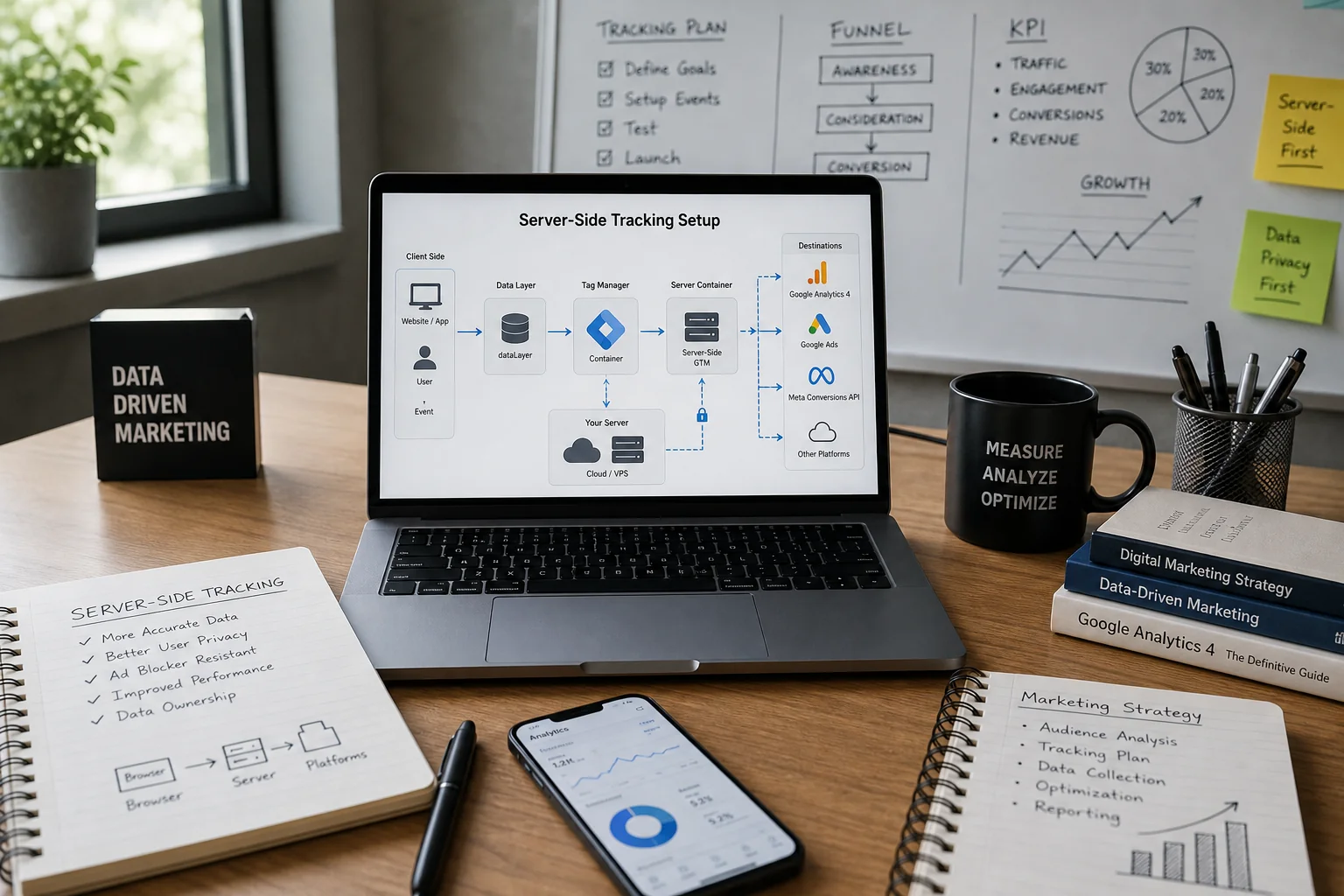
A typical implementation starts when a visitor completes an action on the website. The website generates an event, which the browser-side tracking configuration sends to the server container. A compatible server-side client receives the request and transforms it into event data that server-side tags can use. A configured CAPI tag then sends the appropriate information to Meta.
This architecture provides more control over event parameters, data routing, and the information shared with advertising platforms. However, it still depends on accurate event collection at the original source. If a website never generates a purchase event, introducing a server container will not automatically recreate that missing transaction.
Businesses deciding between measurement architectures can consult Mass Data's comparison of server-side GTM vs client-side GTM, which explains their technical differences and practical implications for tracking.
Step 1: Prepare
Your Tracking Architecture

Before creating a new server container, audit the tracking systems already installed on your website. Many businesses have accumulated several tracking methods over time, including Meta Pixel integrations, ecommerce plugins, Google Tag Manager configurations, and platform-specific connectors. Adding another implementation without understanding the existing setup can introduce duplicate events and conflicting measurement.
Identify the events that matter to the business and document where they originate. An ecommerce website may need ViewContent, AddToCart, InitiateCheckout, and Purchase, while a lead-generation website may prioritize Lead, CompleteRegistration, or appropriately named custom events. Event naming, triggering conditions, values, currencies, and identifiers should be defined before configuring server-side delivery.
You should also determine which system represents the authoritative record for each business action. For purchases, this is commonly the ecommerce backend or order management system. For qualified leads, it may be the CRM. This distinction becomes important later because sending an event to Meta is not the same as verifying that a transaction occurred or determining which advertisement should receive conversion credit.
Step 2: Create and
Configure a GTM Server-Side Container
The first technical step is to create a server container in Google Tag Manager. Within the relevant GTM account, create a new container and select Server as the target platform. The container must then be deployed to an appropriate hosting environment capable of receiving and processing measurement requests.
Google offers deployment options using Google Cloud, while compatible non-Google infrastructure can also be used. The choice depends on technical requirements, infrastructure management, expected traffic volume, and operational costs. Google Cloud provisioning can simplify the initial setup, but production environments still require suitable configuration, monitoring, and capacity planning.
Google's official server-side tagging documentation explains the container creation process, hosting options, and configuration of a custom tagging domain.
Configure a First-Party Tagging Domain
Instead of relying exclusively on a default hosting URL, businesses should consider configuring an appropriate first-party tagging subdomain, such as analytics.example.com. This makes the measurement endpoint part of the organization's domain architecture and can provide technical advantages depending on the deployment.
The domain must be connected to the hosting environment using the required DNS and platform configuration. HTTPS, access controls, and hosting reliability should also be verified before sending production traffic.
A first-party tagging domain is not a guarantee that tracking will bypass browser restrictions or capture every visitor. It should be implemented as part of a properly governed measurement architecture, with consent requirements and data handling rules applied consistently.
Step 3: Send Website
Events to the Server Container
Once the server container is available, the website must send appropriate measurement requests to it. This is commonly achieved through a web GTM container or Google tag configuration that routes supported events to the server-side endpoint.
One implementation approach uses Google Analytics 4 event requests as the transport mechanism. The server-side GA4 client receives those requests and converts them into an event data object that compatible server tags can use. This does not mean that every GA4 event must automatically be forwarded to Meta, or that the two platforms should share identical conversion definitions.
The event data should include the information required for the intended destination. For a purchase, that may involve the event name, transaction identifier, currency, value, and relevant product details. For a lead, the business may need the form submission status, lead identifier, and other appropriately collected information that supports subsequent measurement.
Understand the Difference Between the Data Layer and Server Events
The website's dataLayer is a browser-side structure used to communicate information to Google Tag Manager. It does not automatically become available inside the server container.
The web configuration must first translate relevant information into requests that the server container can receive. A server-side client then processes those requests into an event data object.
This distinction is important when troubleshooting missing parameters. An event may contain a transaction ID in the browser's data layer while the corresponding server event lacks that value because it was never included in the outgoing request.
Before moving forward, verify that the server container receives the intended events and that their relevant parameters remain intact.
Step 4: Configure Meta
Conversions API in Server GTM

With website events reaching the server container, the next step is to configure delivery to Meta. Open Meta Events Manager, select the appropriate dataset associated with your website, and review the available Conversions API setup options. The implementation generally requires a dataset or Pixel ID, an access token, and a compatible server-side tag.
The access token authorizes requests to Meta's API and must be protected as a credential. It should remain within an appropriately secured server environment rather than being exposed in browser code or publicly accessible configuration. Depending on the chosen implementation, you may use a Meta-supported tag template, a compatible third-party template, or a custom integration.
Map Events and Required Parameters
A successful meta capi gtm server-side setup requires the server tag to translate incoming event data into the format Meta expects. This includes matching website actions with appropriate Meta standard or custom event names and providing the required event information.
Important parameters include:
-
event_name: The event being recorded, such asPurchase,Lead, orAddToCart. -
event_time: The time when the action occurred, represented as a Unix timestamp in seconds. -
action_source: The source of the event, such aswebsite. -
event_id: An identifier used to recognize the same customer action across browser and server tracking. -
user_data: Permitted customer information or matching signals, formatted according to Meta's requirements.
Website events also need appropriate source information, and purchase events typically include additional commercial parameters such as value and currency. The precise mapping depends on the event and the capabilities of the selected tag template.
It is important to verify how each field reaches the server container. A correctly populated website data layer does not guarantee that all information is available in the server-side event. Review the incoming event data, configure the relevant variables, and confirm that the outgoing CAPI request contains the intended values before publishing the implementation.
Step 5: Configure Meta
Pixel and CAPI Deduplication
One of the most important elements of the implementation is event deduplication. Businesses often use Meta Pixel and Conversions API together because the two methods can provide complementary measurement signals. However, when both systems report the same customer action, Meta needs a reliable way to recognize that the events represent one conversion rather than two separate actions.
The recommended approach uses matching event names and event identifiers. The browser Pixel sends an identifier using eventID, while the Conversions API uses event_id. These parameters must contain the same value for the same customer action, and the event names must also match. Meta's documented deduplication process recognizes matching browser and server events received for the same dataset within its applicable time window, commonly 48 hours.
For example, a completed purchase might generate a unique identifier based on its order record. The browser event and the server event should both use that identifier, while a different purchase must receive a different identifier. Generating unrelated random identifiers separately in the browser and server will prevent reliable matching.
Why Duplicate Events Still Occur
Deduplication problems often begin when several tracking systems operate simultaneously. An ecommerce plugin may send a server event while a separate GTM implementation sends another copy, or the Pixel and CAPI events may use different names. Repeated checkout confirmations, retries, and independently generated event IDs can create additional problems.
It is also important to distinguish event deduplication from attribution. Deduplication concerns whether the same action is recorded more than once, while attribution determines whether an advertising interaction receives credit for that action. They solve different measurement problems and should be investigated separately.
Mass Data's guide to Meta CAPI duplicate events and how to fix them explores these issues in greater detail, including event ID mismatches and conflicts between browser and server tracking.
Step 6: Apply Consent
and Protect Customer Data

Server-side tracking gives businesses more control over the processing and distribution of measurement data, but it does not automatically make an implementation compliant with privacy regulations. Moving information from a browser to a server does not remove legal obligations concerning consent, transparency, data minimization, or permitted advertising use.
For websites operating in jurisdictions such as the European Union, appropriate privacy and consent requirements must be considered before transmitting personal information to Meta. The configuration should reflect the permissions users have actually provided and prevent information from being forwarded when the relevant processing is not authorized.
The server container can provide a useful control point for filtering, transforming, or excluding data before sending it to advertising platforms. However, those controls must be deliberately configured and tested. A server-side implementation should never be treated as a method for bypassing a visitor's consent decision or browser privacy preferences.
Handle Customer Matching Information Carefully
Meta supports customer matching parameters that may help associate eligible server events with advertising interactions. These can include appropriately formatted email addresses, telephone numbers, browser identifiers, and other supported signals.
Certain personal identifiers must be normalized and hashed using the appropriate method before transmission. Other technical parameters, such as browser identifiers and user-agent information, follow different formatting requirements and should not automatically be hashed in the same way. All information must be collected and transmitted only when there is an appropriate basis for doing so.
Businesses should avoid sending unnecessary customer information simply to improve event matching. Greater data volume does not automatically create better measurement, and strong privacy controls should remain part of the implementation from the beginning.
Step 7: Test Your
Meta CAPI GTM Server-Side Setup
Testing should cover the complete event journey, from the original website action to the event received by Meta. A tag appearing as successful in Google Tag Manager does not, by itself, prove that the final conversion has been accepted, matched, and recorded correctly.
Begin with Google Tag Manager's Preview mode and trigger the relevant website actions. Inspect the requests reaching the server container, confirm which client receives them, and examine the resulting event data. Verify that the expected server-side tag executes and that the request contains the required parameters.
Next, use Meta Events Manager's testing and diagnostic capabilities to confirm that events reach the intended dataset. Review event names, parameters, delivery status, and available deduplication information. Where the Pixel and CAPI both report an action, verify that the corresponding event identifiers match.
Test Under Realistic Conditions
Testing should include more than one successful purchase or form submission. Check what happens when a visitor refreshes a confirmation page, navigates backward, encounters a failed payment, or completes multiple legitimate transactions. These scenarios can reveal duplicate events, incorrect triggers, or transaction identifiers that are not handled consistently.
Consent behavior also requires testing. Verify that permitted and restricted event flows behave according to the applicable privacy requirements, including after a user changes their consent preferences. The implementation should also handle temporary network failures without generating additional unintended conversions.
If the server container does not receive expected requests, Mass Data's article on troubleshooting GTM server-side containers that are not receiving events explains how to investigate routing, event parameters, triggers, and configuration problems.
Understanding Differences Between Meta,
GA4, and Backend Conversions

After implementing CAPI, businesses often expect Meta Ads, GA4, and ecommerce platforms to display identical conversion totals. This expectation is unrealistic because the systems measure different aspects of customer activity and may use different attribution methodologies.
An ecommerce backend records completed transactions according to its order management process. GA4 records analytics events according to its configuration and available measurement signals, while Meta reports conversions associated with advertising activity under its applicable attribution settings.
For example, Meta may attribute a purchase to an eligible advertisement interaction even when GA4 assigns credit differently. Consent restrictions, conversion windows, event timing, and reporting definitions can create further differences. These discrepancies do not necessarily indicate a technical failure.
Mass Data's explanation of GA4 vs Meta Ads conversion discrepancies examines why the platforms can report different results and how businesses should interpret those differences.
When a Tracking Audit Is Necessary
A detailed investigation becomes appropriate when reported conversions change unexpectedly, duplicate events appear, or important customer actions fail to reach the advertising platform. The review should determine whether the problem originates from event collection, server routing, deduplication, consent configuration, or attribution.
Businesses should compare events against verified backend outcomes while accounting for legitimate reporting differences. A tracking audit may also reveal conflicting integrations, incorrect transaction values, or outdated tracking configurations that influence campaign optimization.
Mass Data's conversion tracking audit services cover Google Tag Manager, server-side tracking, Meta CAPI, GA4, and cross-platform reporting issues. The objective is to establish reliable measurement rather than force every system to produce the same numbers.
Hypothetical Example: Server-Side Purchase
Tracking for an Ecommerce Store
Consider a hypothetical ecommerce retailer using Meta Ads to promote its products. The business currently relies on browser-based Pixel tracking and notices that some purchases recorded in its ecommerce platform are not visible in the same way in Meta's reporting. Before introducing CAPI, the technical team reviews the existing Pixel implementation, consent controls, and purchase event definitions.
The team then configures a server-side GTM container and connects its website measurement flow to the server endpoint. Purchase events include the relevant transaction identifier, value, currency, and other permitted information. The server-side configuration maps these events to Meta's Conversions API while preserving the existing Pixel implementation where appropriate.
To prevent duplicate conversions, the team uses a shared event identifier for the browser and server copies of each purchase. It tests completed orders, unsuccessful payments, repeat page visits, and consent variations before publishing the configuration.
After launch, the team monitors event delivery, deduplication, and reporting quality. It compares backend transactions with the measurement information available in GA4 and Meta, while recognizing that attribution differences may remain. This hypothetical example illustrates an implementation process, not verified client results or a guarantee of increased tracked conversions.
Costs, Maintenance, and
Long-Term Tracking Reliability
A server-side implementation introduces infrastructure and maintenance requirements that businesses should consider before deployment. Unlike a basic browser-side GTM setup, a server container needs a hosting environment, appropriate resources, security configuration, and monitoring.
Infrastructure costs depend on traffic volume, hosting choices, and the resources allocated to the environment. Additional expenses may include initial technical implementation, integration maintenance, consent configuration, and troubleshooting. Small businesses should assess whether the benefits justify that complexity rather than assuming server-side tracking is automatically the best option.
Once implemented, the system needs ongoing maintenance. Changes to ecommerce checkout processes, website plugins, data layers, Meta event requirements, or GTM configurations can affect tracking even if the original setup worked correctly. Regular monitoring helps businesses identify these issues before they influence major marketing decisions.
For companies that also need to combine advertising, analytics, and business data, Mass Data's business intelligence and data reporting services support connected measurement systems, attribution analysis, and reliable reporting infrastructure.
Conclusion
A reliable meta capi gtm server-side setup can improve how businesses manage advertising measurement by introducing a controlled environment for event processing and delivery. However, the effectiveness of the system depends on the quality of its implementation rather than the decision to use server-side technology alone.
Accurate event mapping, consistent identifiers, proper deduplication, privacy controls, and thorough testing are all essential. Without these foundations, an additional tracking pathway can introduce new discrepancies instead of resolving existing ones.
Businesses should start by auditing their current Pixel and conversion tracking configurations, then identify whether server-side delivery addresses a genuine measurement limitation. The most valuable outcome is not simply sending more events to Meta, but creating dependable, appropriately collected conversion information that supports better advertising and business decisions.
Questions
Answered
Common questions related to this topic.
What is meta capi gtm server-side setup?
Meta CAPI GTM server-side setup refers to the integration of Meta's Conversions API with Google Tag Manager's server-side tagging capabilities. This setup allows businesses to send user event data directly from their servers to Meta, improving the accuracy of tracking and enhancing data privacy.
How does meta capi gtm server-side setup work?
The setup involves configuring Google Tag Manager to handle data collection on the server side rather than the client side. This means that user interactions are captured and sent to Meta's servers via HTTP requests, reducing reliance on browser-based tracking methods and improving data security.
Why should I implement meta capi gtm server-side setup?
Implementing this setup enhances data accuracy and privacy by reducing data loss from ad blockers and browser restrictions. Additionally, it allows for better event matching and deduplication, which can ultimately lead to more efficient ad targeting and improved campaign performance.
Can small businesses benefit from meta capi gtm server-side setup?
Yes, small businesses can greatly benefit from this setup. Contrary to the misconception that it's only for large enterprises, server-side tracking can provide valuable insights and data accuracy, helping small businesses optimize their advertising strategies effectively.
When should I consider switching to server-side tagging with meta CAPI?
Consider switching when you notice significant data discrepancies or when your website's performance is affected by client-side tracking limitations. If you aim to improve data privacy and enhance user experience, transitioning to server-side tagging with Meta CAPI is a strategic move.
Should I still use the Facebook Pixel with meta capi gtm server-side setup?
Yes, using the Facebook Pixel alongside the Meta CAPI can be beneficial. While CAPI complements the Pixel by providing additional data directly from your server, utilizing both can enhance your tracking capabilities and ensure more comprehensive data collection for ad performance analysis.
Ready To GrowThis Into Results?
Learn how to implement Meta Conversions API using Google Tag Manager server-side. This step-by-step guide covers GTM server containers, Meta CAPI event configuration, Pixel deduplication, customer data handling, consent requirements, testing, and common tracking problems.
Prefer to reach out directly? We'll get back to you as soon as possible.
Contact MASS DATA Today