
MASS DATA — Technical Tracking & Analytics

Server-Side GTM vs Client-Side: When Migration Matters

Discover when server-side GTM vs client-side migration is worth it for better data accuracy and performance.

When considering server-side GTM vs client-side, many marketers face a critical decision that can impact data accuracy and privacy compliance. As digital landscapes evolve, understanding the differences between these two tagging methods is essential. Server-side tagging allows for better data control and improved performance, while client-side tagging remains the traditional approach that most are familiar with.

Key Takeaways
Server-side tagging offers enhanced control over data collection and user privacy.
Client-side tagging is simpler but can be affected by browser restrictions and ad blockers.
Deciding when to migrate involves weighing potential benefits against implementation challenges.
Infographic comparing Server-Side and Client-Side Google Tag Manager, highlighting features with icons and a migration pathwa

Understanding Server-Side
GTM vs Client-Side

Key Components of Each Approach

Server-side Google Tag Manager (SGTM) and client-side Google Tag Manager (GTM) have distinct architectures that impact data collection and reporting.

  • Client-side GTM operates within the user's browser. Tags are executed directly on the user's device, relying on JavaScript to gather data. This approach is susceptible to ad blockers, cookie restrictions, and browser settings, which can lead to data discrepancies.
  • Server-side GTM, on the other hand, processes tags on a remote server. This method reduces reliance on the client’s browser, enabling more robust data collection and better privacy control. It can improve data completeness by reducing reliance on the browser, though deduplication still depends on correctly sharing a matching event_id across the Pixel and Conversions API.

How Server-Side Tagging Works

In SGTM, tags are executed on the server, allowing for streamlined data handling. The data layer—an object that contains information about user interactions—is sent to the server where tags are processed.

Key benefits include:

  • Improved Data Privacy: Sensitive data can be managed more securely.
  • Reduced Client Load: Since the processing happens server-side, page load times can improve.
  • Enhanced Data Accuracy: This method can provide more consistent server-side event collection, though attribution-window differences between platforms are a counting-method issue that server-side tagging does not by itself resolve.

For example, if a user interacts with multiple touchpoints before conversion, server-side tagging can link these events more accurately than client-side methods.

Mechanisms of Client-Side Tagging

Client-side tagging uses JavaScript to collect data in the user’s browser. This process involves several stages:

  1. Tag Firing: Tags are triggered based on specific events (e.g., clicks, page views).
  2. Data Layer Interaction: The data layer passes information to the tags for processing.
  3. Reporting: Data is sent to various platforms (e.g., Google Analytics, Meta Ads) for attribution.

However, client-side tagging is affected by various challenges that can lead to data inaccuracies.

Benefits of
Server-Side Tagging Migration

Improved Data Accuracy

One of the primary advantages of migrating to server-side tagging is enhanced data accuracy. In client-side tagging, data is collected directly from the user's browser, which can lead to discrepancies. Factors like browser settings, ad blockers, and even network issues can interfere with the data sent to analytics platforms. For instance, if a user has an ad blocker enabled, tracking scripts might not fire, resulting in missed events. Server-side tagging mitigates this issue by processing data on the server, allowing for more consistent tracking. This setup helps ensure that event_id and other critical metrics are recorded accurately, leading to more reliable reporting.

Enhanced Privacy Compliance

Another significant benefit of server-side tagging is improved privacy compliance. With growing concerns over data privacy and regulations like GDPR and CCPA, businesses must be diligent in how they collect and manage user data. Server-side implementations can better control what data is sent and to which platforms, allowing for a more transparent consent mode. Server-side tagging still requires a lawful consent signal, but it can give companies more centralized control over which data is forwarded to each platform once consent is established. This means less risk of violating privacy laws and better trust with users.

Reduced Impact of Ad Blockers

Ad blockers pose a significant challenge for marketers using client-side tagging. These tools often prevent scripts from executing, which can lead to underreported events and conversions. Server-side tagging reduces this impact by limiting the reliance on client-side scripts. Since the data collection occurs on the server, it is less susceptible to interference from ad blockers. Consequently, businesses can achieve a fuller picture of user interactions. For audiences that rely heavily on ad blockers, server-side tagging may capture some events that client-side scripts miss, though the actual recovery depends on your setup and consent requirements.

By considering these benefits, businesses can better understand when to make the leap from client-side implementations to server-side tagging. For those intrigued by the potential of server-side GTM, exploring a Conversion Tracking Audit can reveal current discrepancies and offer a clear path forward.

When is a Server-Side
GTM Migration Worth It?
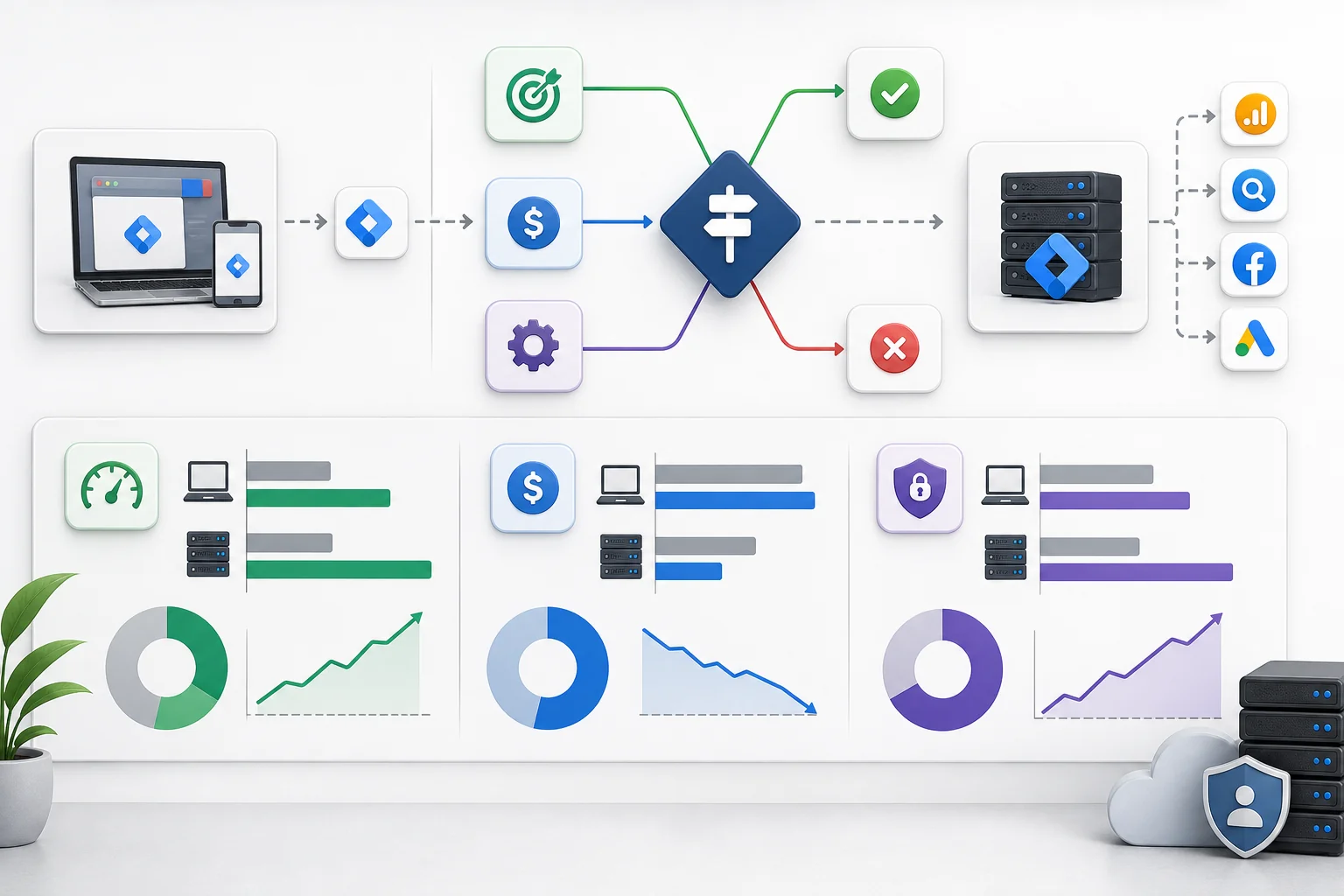
Infographic illustrating migration from client-side to server-side GTM, featuring flowcharts, comparisons, and modern visuals

Evaluating Business Needs

Deciding whether to migrate from client-side to server-side Google Tag Manager (GTM) should begin with a clear understanding of your business objectives. Consider the following:

  • Data Accuracy: If your organization frequently experiences discrepancies in conversion tracking across platforms, server-side GTM can help mitigate issues related to deduplication logic and improper event matching. By handling data on the server, you can reduce the risk of data loss due to ad blockers or browser privacy settings.
  • Privacy Concerns: With increasing regulations like GDPR and CCPA, server-side implementations can offer better control over user data. You can manage consent mode more effectively, allowing for compliant data handling practices.

Cost Considerations in GTM Migration

The financial implications of migrating to server-side GTM can vary widely. Key factors include:

  • Infrastructure Requirements: Setting up a server-side GTM environment may involve initial costs for server hosting and maintenance. However, many businesses find that the long-term benefits—such as improved data accuracy and reduced reliance on third-party cookies—justify these expenses.
  • Ongoing Management: While server-side tagging can streamline processes, it requires regular monitoring and updates. Consider whether your team has the capacity to manage these changes or if you will need external support.

Assessing Technical Readiness

Before migrating, assess your technical capabilities:

  • Current Setup: Evaluate your existing client-side GTM implementation and data layer structure. A complex setup may require more extensive changes during migration.
  • Team Expertise: Ensure your team possesses the necessary skills or is prepared to learn about server-side tagging. Understanding how to set up and manage server-side GTM effectively is crucial for a successful transition.

By carefully evaluating these aspects, you can determine if migrating to server-side GTM aligns with your organization's goals and technical capacity. If inconsistent data is a recurring issue, consider a Conversion Tracking Audit to identify specific discrepancies and their root causes.

Implementation Steps
for Server-Side GTM

Migrating to server-side Google Tag Manager (GTM) can provide significant advantages, such as enhanced data accuracy and improved privacy compliance. However, the implementation process requires careful planning and execution. Below are the critical steps to consider.

Setting Up Your Server Environment

The first step is to establish a server environment to host your GTM container. You can choose cloud providers like Google Cloud Platform (GCP) or AWS. Key considerations include:

  • Server Configuration: Select a machine type and operating system that can handle your expected traffic. For example, a virtual machine with sufficient memory and processing power is crucial.
  • Domain Setup: Ensure your server has a dedicated domain for your GTM container. This helps in managing requests and maintaining consistency across platforms.

Configuring Your GTM Server Container

Once the server environment is in place, configure the GTM server container. This involves:

  • Creating a Server Container: In GTM, create a new container specifically for server-side tagging. This will differ from your existing client-side container.
  • Setting Up Client and Endpoint: Define how your server will receive data from your website. You can use a Data Layer to facilitate this. Each data event should have a unique event_id to help track and correlate data accurately.
  • Privacy Settings: Configure consent mode to respect user privacy preferences. This ensures compliance with regulations like GDPR and CCPA, allowing you to manage data collection based on user consent.

Transitioning from Client-Side to Server-Side

The final step is to transition your existing client-side implementation to server-side. This includes:

  • Mapping Client-Side Tags to Server-Side Tags: Each tag should be evaluated for its server-side equivalent. Some tags may require modifications to work correctly in the new environment.
  • Testing and Validation: Before fully switching over, conduct thorough testing to ensure that data flows correctly to your analytics platforms. Use a staging environment to identify any issues.

Common Challenges
in Server-Side Tagging

Infographic illustrating server-side tagging challenges: complexity, integration, performance, security, and resource allocat

Transitioning to server-side tagging can present several challenges that require careful consideration. Understanding these challenges can help marketing directors and analysts make informed decisions about whether to migrate from a client-side approach.

Addressing Data Layer Complexity

One of the primary hurdles in server-side tagging is managing the data layer’s complexity. A data layer is a structured format for passing information to Google Tag Manager (GTM). In server-side environments, this data layer must be meticulously configured to ensure accurate data collection. For instance, if the data layer is not properly aligned with server-side processing, it may lead to inconsistent data being sent to platforms like Google Analytics 4 (GA4). This misalignment can result from variations in how events are defined between server-side and client-side implementations, complicating event matching.

Managing Consent and Privacy

With increasing regulations around data privacy, managing user consent becomes more intricate in server-side setups. Consent mode is a feature that adjusts the behavior of Google tags based on whether users have given consent. Server-side configurations may require additional programming to ensure that consent preferences are respected. If not properly implemented, discrepancies can arise, leading to underreporting of conversions or inflated metrics due to improper data collection practices. For example, imagine that users opt out of tracking, but server-side scripts still send data to GA4, creating a compliance risk.

Troubleshooting Data Discrepancies

Data discrepancies between platforms often stem from differing attribution models and reporting scopes. In server-side setups, the event_id parameter must be accurately managed to prevent duplicate or missed conversions. For instance, if two different platforms attribute a conversion to the same user interaction but use different attribution windows, the reported numbers will not align. Understanding how each platform handles deduplication logic and attribution is vital for resolving these discrepancies. Without proper troubleshooting, businesses may face challenges in understanding their true performance metrics and ROI.

In conclusion, while server-side tagging can offer benefits, it is essential to address these common challenges to ensure a successful migration. For businesses facing data inconsistencies, consider our Conversion Tracking Audit service to identify and rectify issues effectively.

Best Practices
for Server-Side GTM

Migrating to Server-Side Google Tag Manager (SGTM) can enhance data accuracy and control, but it requires diligent management to reap its full benefits. Here are some best practices to ensure a successful implementation.

Regular Monitoring and Maintenance

Regular oversight of your server-side GTM setup is crucial for optimal performance. Monitor key metrics to identify anomalies in data collection. This could include discrepancies in event counts between platforms, which often arise from attribution windows or deduplication logic. By establishing a routine check of your data flows, you can spot potential issues early, such as failed requests or unauthorized access attempts, ensuring your data remains reliable and secure.

Documentation and Version Control

Maintaining comprehensive documentation is essential for any technical system. Document your server-side GTM configurations, including the data layer structure and any custom scripts. Version control helps track changes, making it easier to revert to previous configurations if needed. This practice not only aids in troubleshooting but also provides clarity for team members who may work on the system in the future.

Collaborating with Development Teams

Successful server-side implementations often require collaboration between marketing and development teams. Engage developers early to understand technical constraints and opportunities. For example, they can assist in optimizing the load times of server-side tags, which can be affected by how data is processed. Establish regular communication to align on goals and share insights about the data collected. This collaboration can lead to more effective tracking strategies and a more robust understanding of user behavior.

By following these best practices, your transition to server-side GTM can lead to improved tracking accuracy and enhanced data privacy. For organizations facing challenges with data discrepancies, consider our Conversion Tracking Audit service to identify and rectify issues effectively.

Tools and Resources
for Effective Tagging
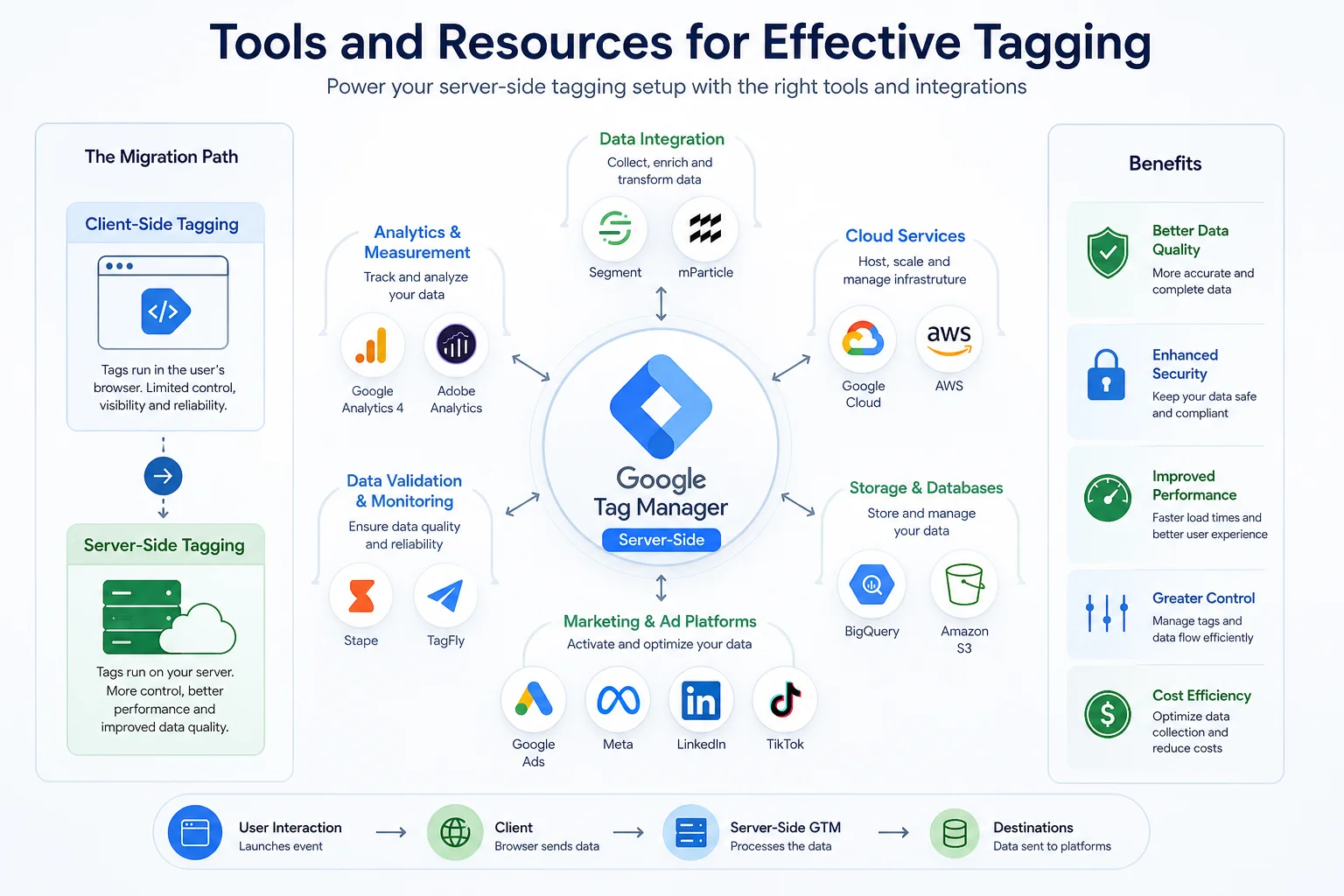
Infographic showcasing Google Tag Manager at the center, surrounded by icons of data tools, with arrows illustrating tagging

Recommended Platforms and Integrations

When considering the migration from client-side tagging to server-side tagging (SGTM), it’s essential to evaluate the tools and integrations that can optimize your setup. Google Tag Manager (GTM) remains the leading choice for both client-side and server-side implementations. For server-side setups, you may integrate with platforms like:

  • Google Cloud Platform (GCP): Provides the necessary infrastructure for hosting your server-side GTM instance.
  • Firebase: Good for mobile tracking and can complement server-side analytics.
  • AWS Lambda: Allows for scalable server-side logic without managing servers directly.

These platforms can enhance your data handling capabilities and improve compliance with privacy regulations.

Useful Guides and Documentation

Proper documentation is critical for a seamless migration. Google offers extensive resources for both GTM and SGTM. Key documents include:

  • GTM Documentation: Offers in-depth guides on setting up and managing tags effectively.
  • Server-side GTM Documentation: Focuses on migration steps, best practices, and troubleshooting common issues.
  • Consent Mode Documentation: Essential for understanding how user consent impacts data collection and reporting.

Utilizing these resources can significantly reduce implementation errors and ensure compliance with data privacy laws.

Analytics Tools for Performance Tracking

After migrating to server-side tagging, monitoring performance is crucial. Consider integrating the following analytics tools:

  • Google Analytics 4 (GA4): Provides advanced tracking capabilities and better cross-platform data integration.
  • Looker Studio: Useful for visualizing data and identifying discrepancies between platforms.
  • Datadog or New Relic: These tools can help monitor server performance and identify potential bottlenecks in your tagging setup.

By leveraging these tools, you can gain insights into user behavior and track the effectiveness of your marketing efforts more accurately. For more tailored support, consider our Conversion Tracking Audit to address any inconsistencies in your data collection and reporting.

Conclusion
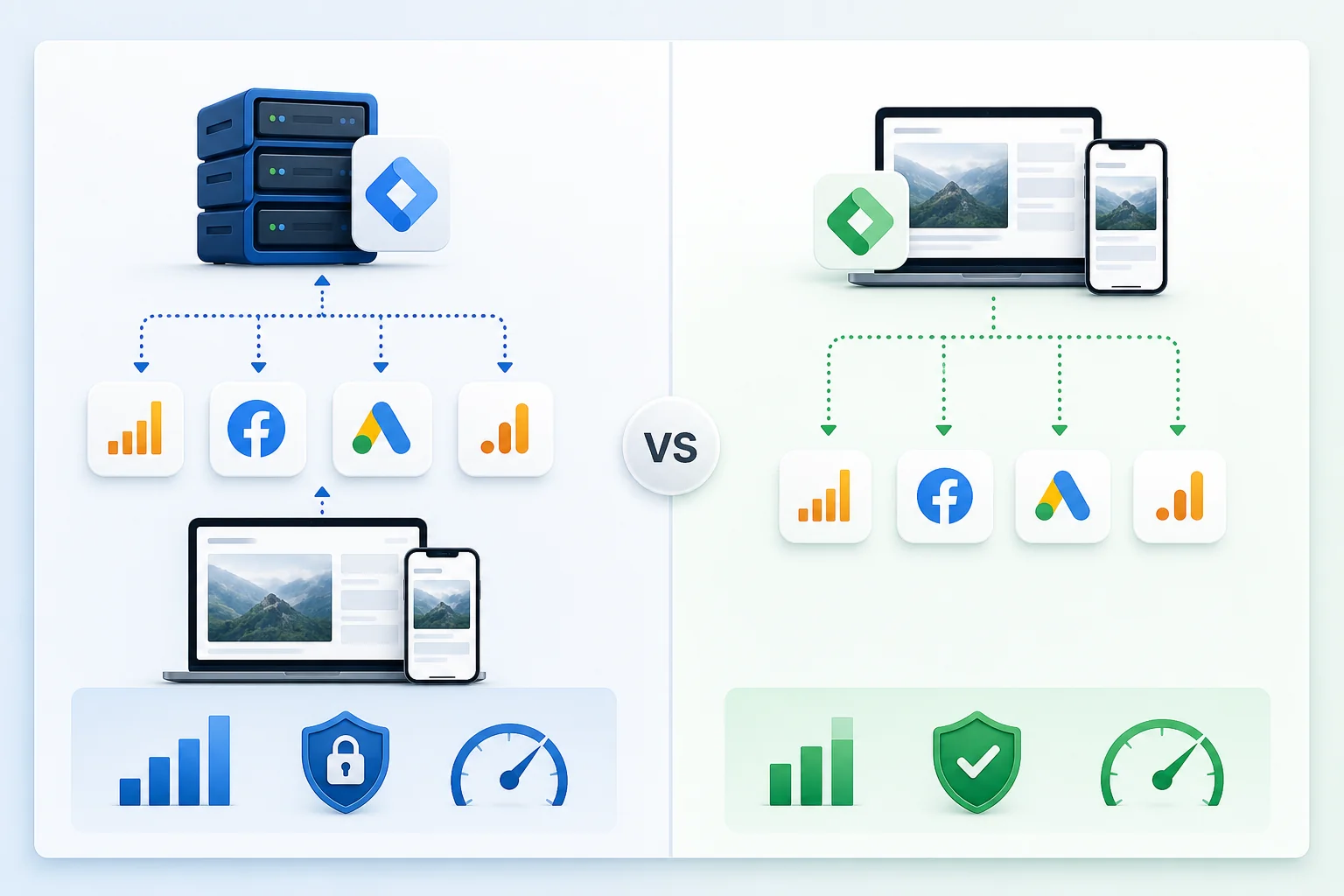
Infographic comparing server-side and client-side tagging with icons for data accuracy, privacy, and performance in a split l

In summary, comparing server-side GTM vs client-side tagging reveals significant differences in data handling, privacy compliance, and performance. Server-side tagging can enhance data accuracy and reduce reliance on client-side factors, making it a powerful choice for businesses facing new privacy regulations and browser limitations. However, the migration process requires careful planning and an understanding of potential challenges.

Ultimately, the decision to migrate should be based on specific business needs and the potential benefits outlined. Start by assessing your current tagging setup and consider the advantages of server-side solutions. Taking this approach can lead to more reliable data and improved marketing outcomes.

Questions
Answered

Common questions related to this topic.

What is server-side gtm vs client-side?

Server-side GTM processes tracking tags on the server instead of the user's browser, enhancing data control and privacy. In contrast, client-side GTM executes tags in the browser, making it vulnerable to ad blockers and browser restrictions. This difference can significantly impact data accuracy and user privacy.

How does server-side gtM vs client-side work?

Server-side GTM involves setting up a server that collects and processes data before sending it to analytics platforms. This method enables better data management and compliance with privacy regulations. By reducing client-side load, it can improve site performance and enhance user experience.

When should I consider migrating to server-side GTM?

Consider migrating when you face data discrepancies across platforms or need improved privacy compliance. If your current client-side setup is affected by browser restrictions or ad blockers, a server-side approach can provide more reliable data collection and better insights into user behavior.

Can server-side GTM improve my tracking accuracy?

Yes, server-side GTM can enhance tracking accuracy by minimizing the impact of browser settings and ad blockers. By handling data on the server, you gain more control over how events are recorded and attributed, leading to more consistent reporting across platforms.

Why is server-side tagging considered more secure?

Server-side tagging is often viewed as more secure due to its ability to manage user consent more effectively and shield sensitive data from client-side vulnerabilities. By processing data on the server, organizations can implement better privacy measures and comply with regulations like GDPR and CCPA.

Should I switch to server-side GTM if I notice discrepancies?

Switching to server-side GTM can help address discrepancies, especially if they stem from client-side limitations. However, consider your specific needs, migration costs, and the resources available for implementation before making the transition.

Free Strategy Call

Ready To GrowThis Into Results?

Discover when server-side GTM vs client-side migration is worth it for better data accuracy and performance.

Opportunity Assessment
Channel Review
Growth Recommendations
No Obligation
OR

Prefer to reach out directly? We'll get back to you as soon as possible.

Contact MASS DATA Today
Scroll to Top