Zapier vs Make for AI Marketing Automation: Which to Choose?
In the battle of Zapier vs Make for AI marketing automation, choosing the right platform can be challenging yet crucial. This article unpacks their unique features, integration capabilities, and how AI-driven workflows can elevate your marketing efficiency.
When it comes to zapier vs make ai marketing automation, choosing the right tool can be daunting. Both platforms offer unique features that can enhance your marketing workflows through automation and artificial intelligence. This article will guide you through their capabilities, helping you make an informed decision.

Understanding Zapier vs Make
in AI Marketing Automation
Key Features of Zapier
Zapier is well-known for its user-friendly interface and extensive integration capabilities. It supports thousands of applications, allowing users to connect tools like HubSpot, Klaviyo, and more. Here are some key features:
- Zaps: Automated workflows triggered by specific events. For example, when a lead fills out a form in HubSpot, a Zap can automatically add them to your email marketing list in Klaviyo.
- Triggers and Actions: Zapier uses a straightforward model where a defined trigger (like a new lead) prompts a specific action (like sending a welcome email).
- Multi-step Zaps: Users can create complex workflows that involve multiple steps, although this can lead to more complexity in setup.
However, while Zapier excels in basic automation, more advanced AI functionality may depend on additional tools or integrations.
Key Features of Make
Make offers a more visual approach to automation, which can be beneficial for complex workflows. Its features include:
- Scenarios: These are similar to Zaps but allow for a more detailed and visual setup. Users can see the flow of data between apps clearly.
- Modules: Each module performs a specific action within a scenario, providing flexibility in how tasks are automated.
- Data Manipulation: Make offers robust data transformation options, enabling users to manipulate data as it moves between applications.
For example, imagine creating a scenario where customer feedback from a survey automatically updates a Google Sheet and triggers a follow-up email in Klaviyo. Make’s capabilities can handle this complexity more intuitively.
Both platforms have their strengths. Zapier is great for straightforward tasks, while Make shines in visualizing and managing complex workflows. However, users should consider their specific needs and potential limitations when choosing between them for AI-driven marketing automation.
Benefits of
Using AI-Driven Workflows
AI-driven workflows can provide significant advantages in automating marketing processes. By integrating tools like Zapier and Make, businesses can enhance their efficiency and manage data more effectively.
Increased Efficiency
One of the main benefits of using AI in workflows is the boost in efficiency it offers. Automation tools can handle repetitive tasks, allowing marketing teams to focus on strategy and creativity. For instance, when a lead fills out a contact form, an automation can send a personalized email response while simultaneously updating the CRM. This eliminates manual entry and the potential for errors, streamlining the lead nurturing process.
Moreover, AI can analyze data patterns and adjust workflows in real-time. For example, if a particular email campaign underperforms, AI can trigger a different follow-up sequence based on predictive analytics. This adjustment can happen without human intervention, facilitating quicker responses to market conditions.
Enhanced Data Management
Effective data management is crucial for informed marketing decisions. AI-driven workflows improve how data is collected, processed, and utilized. For example, both Zapier and Make can integrate with various platforms like HubSpot and Klaviyo, making data flow seamless across systems. When a new contact is added in HubSpot, an automation can create a corresponding entry in the email marketing tool while segmenting the contact based on predefined criteria.
Moreover, AI can help ensure data quality. By implementing validation rules in workflows, businesses can filter out incorrect or duplicate entries before they affect marketing efforts. This proactive approach enhances data integrity, allowing for more reliable insights and reporting.
In summary, leveraging AI-driven workflows in marketing automation can lead to greater efficiency and improved data management. By understanding the capabilities and limitations of tools like Zapier and Make, marketing operations managers and small business owners can make informed decisions that align with their goals.
Automation Tool Comparison:
Zapier and Make
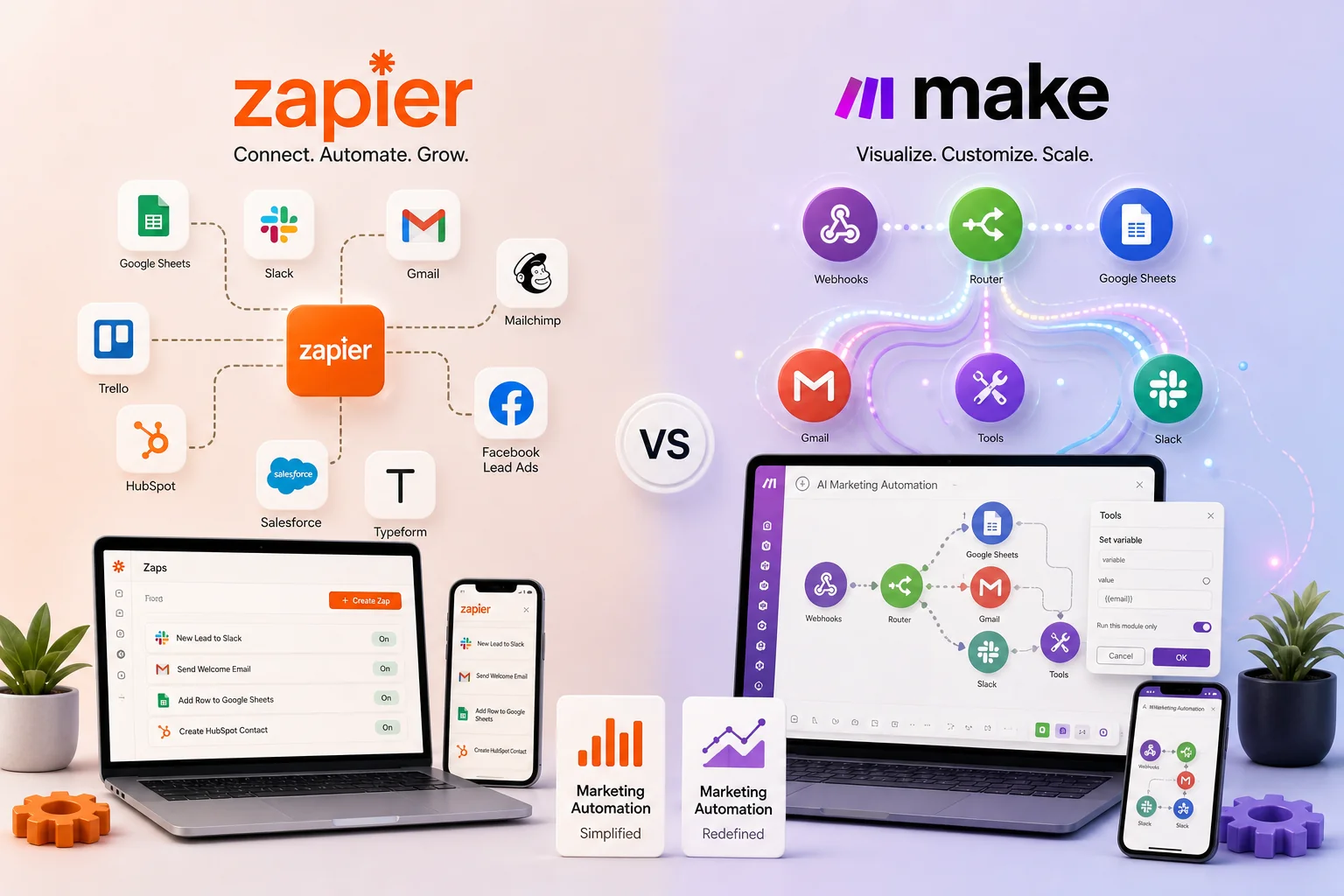
Integration Capabilities
When comparing Zapier and Make for AI-driven marketing automation, integration capabilities are a crucial factor. Both platforms connect with numerous applications, but their approaches differ.
Zapier is known for its extensive library of integrations, often referred to as "Zaps." It connects with a large library of applications, including popular tools like HubSpot and Klaviyo. For instance, when a lead fills out a form on your website, a Zap can trigger an action to send a welcome email via Klaviyo automatically.
On the other hand, Make (formerly Integromat) offers a more visual approach to integrations through its "Scenarios." It connects with a wide range of apps and allows for more complex workflows. For example, you could set up a Scenario that, when a new entry appears in your Google Sheets, it not only notifies your team via Slack but also updates your CRM records.
Workflow Customization Options
Both platforms excel in customizing workflows, but they cater to different user needs.
Zapier is user-friendly and designed for quick setup. Its straightforward interface allows users to create workflows with minimal technical expertise. You can set up a simple automation, like transferring new email subscribers from Mailchimp to a Google Sheet, in just a few clicks.
Make, however, excels in flexibility and complexity. It allows users to build intricate workflows with conditional logic and multiple steps. For instance, imagine you want to segment leads based on their responses in a survey. Make enables you to create a workflow that analyzes the data and sends tailored follow-up emails based on specific criteria.
In summary, while Zapier offers quick and easy integrations ideal for straightforward tasks, Make provides the depth and customization necessary for more complex, multi-step automations. This distinction is essential for marketing operations managers and small business owners considering AI-driven workflows.
How to Implement AI
Workflows with Zapier and Make
Setting Up Your First Workflow
Creating your first AI-driven workflow requires understanding the triggers and actions that each platform supports. Both Zapier and Make offer user-friendly interfaces to help you set up automations without extensive technical knowledge.
- Choose Your Trigger: Start by identifying an event that will kick off your workflow. For example, in Zapier, you might select a trigger like "New Lead in HubSpot." In Make, you can set an event such as "When a new submission occurs in a form."
- Add Actions: After selecting your trigger, define what happens next. In Zapier, you might create an action to "Send an Email via Gmail." In Make, you can connect multiple modules, such as sending a notification to Slack and creating a new contact in your CRM.
- Test Your Workflow: Both platforms allow you to test the automation before it goes live. Running a test ensures that your setup works correctly and that data flows between apps as intended.
Best Practices for Workflow Design
To maximize the effectiveness of your AI-driven workflows, consider these best practices:
- Keep It Simple: Start with straightforward automations before moving to more complex scenarios. This helps you understand the platforms better.
- Monitor Data Quality: Be mindful of how data is transferred between applications. Ensure that data formats are consistent to avoid errors in your workflows.
- Use Conditional Logic: Leverage conditional statements to create more intelligent workflows. For instance, if a lead meets certain criteria, you can trigger different actions based on their behavior.
- Regularly Review and Optimize: Periodically check your workflows to see if they still meet your needs. Adjustments may be necessary as your business evolves.
By following these steps, you can effectively implement AI workflows with either Zapier or Make, allowing you to streamline processes and make data-driven decisions.
Common Challenges and Solutions
In the landscape of marketing automation, both Zapier and Make offer valuable tools for streamlining processes. However, users often encounter challenges that can hinder the effectiveness of their AI-driven workflows. This section outlines common issues and practical solutions to enhance your experience.
Data Quality Risks
One significant challenge in marketing automation is ensuring data quality. Poor data can lead to incorrect insights and ineffective marketing strategies. Common issues include duplicate entries, outdated information, and inconsistent formatting.
To mitigate these risks:
- Implement Data Validation: Use built-in validation features in both Zapier and Make to ensure that incoming data meets specific criteria before it triggers actions. For example, if a lead fills out a form, set rules to check for valid email formats.
- Regular Data Audits: Schedule periodic reviews of your datasets. This can help identify and rectify inconsistencies. For example, imagine running a monthly report that flags any duplicate leads in your CRM.
- Integrate Data Cleaning Tools: Consider integrating tools like Clearbit or NeverBounce with your workflows. These can help maintain data integrity by verifying contact information at the point of entry.
Overcoming Complexity in Workflows
Both platforms offer robust capabilities, but their complexity can be daunting, especially for small business owners. Users may struggle with designing workflows that effectively utilize AI without overcomplicating processes.
To simplify your automation:
- Start Small: Begin with basic workflows. For instance, set up a simple automation where a new lead in your CRM triggers a welcome email via your email marketing tool. Gradually add complexity as you become more comfortable.
- Utilize Templates: Both Zapier and Make offer pre-built templates tailored for common tasks. These can serve as a foundation that you can customize to fit your specific needs.
- Leverage Visual Builders: Use the visual workflow builders available in both platforms. These allow you to see the flow of actions and easily adjust them as necessary, making it simpler to understand how each component interacts.
By addressing these common challenges, you can enhance the effectiveness of your AI-driven workflows and ensure a smoother automation experience.
Tools and Resources
for Effective Automation
Recommended Integrations
When considering Zapier vs Make for AI-driven marketing automation, it's essential to evaluate their integration capabilities with other tools in your tech stack. Both platforms connect to numerous services, allowing you to streamline processes across various applications.
- Zapier Integrations: Zapier supports a broad range of apps, which include popular marketing tools like HubSpot, Klaviyo, and Mailchimp. For instance, when a lead fills out a form on your website (trigger), you can set up a Zap to automatically add that contact to your HubSpot CRM and send a welcome email via Mailchimp (actions).
- Make Integrations: Make, while also robust, offers a unique visual interface that allows for more complex workflows. You can connect apps such as Google Sheets, Facebook Ads, and Trello. For example, imagine you want to track ad performance: when a new lead is generated from a Facebook ad (trigger), you can set a scenario to log this information in Google Sheets and automatically create a task in Trello for follow-up (actions).
Additional Learning Resources
To deepen your understanding of these platforms and their capabilities, consider the following resources:
- Official Documentation: Both Zapier and Make have extensive documentation available on their websites. This is a great starting point to learn about specific features and integration options.
- Community Forums: Platforms like Reddit or dedicated forums for Zapier and Make can provide real user insights and practical tips.
- Webinars and Tutorials: Look for webinars hosted by both companies. They often share best practices and use cases that can inspire your automation strategy.
By leveraging these tools and resources, you can make informed decisions on how to implement AI-driven workflows effectively in your marketing automation strategy.
Hypothetical Example
of AI-Driven Workflows

Scenario with Zapier
For example, imagine a small business using HubSpot to manage leads. When a lead fills out a contact form on their website, Zapier can trigger an automated workflow. This could involve sending an email to the sales team, updating the lead's status in HubSpot, and adding the lead to a specific mailing list in Klaviyo.
Zapier integrates with numerous applications, allowing for seamless data transfer. However, while it can automate repetitive tasks based on triggers, it lacks advanced AI capabilities, such as predictive analytics. Its strength lies in straightforward task automation, making it suitable for businesses looking to streamline operations without complex AI requirements.
Scenario with Make
Now, consider a scenario using Make with a similar setup. When a lead fills out the same contact form, Make can initiate a scenario that not only sends an email to the sales team but also routes the lead's data through connected services for further processing. For instance, it could pull in data from another connected tool to help inform follow-up actions. For instance, it could pull in data from Google Analytics to assess the lead's engagement level and adjust follow-up actions accordingly.
Make's modular approach allows users to create intricate workflows with multiple steps and conditions. It can handle data transformation between applications, making it more flexible for businesses that need to analyze and process data in real time. However, like Zapier, its AI capabilities are still developing. Users should remain cautious and understand the limitations of AI outputs, as they may not always meet expectations.
In both scenarios, the choice between Zapier and Make depends on the complexity of the required workflows and the level of AI-driven insight desired. Understanding these parameters is crucial for effective marketing automation.
Conclusion
In summary, the comparison of zapier vs make ai marketing automation reveals distinct strengths and weaknesses in each platform. Zapier excels in its straightforward integration capabilities, while Make offers more flexibility through its visual workflow builder. Both tools provide valuable AI-driven features that can optimize your marketing processes.
As you weigh your options, consider what best fits your organization's specific needs. Starting with a clear understanding of your workflow requirements will help you select the right tool. Ultimately, embracing automation can lead to improved efficiency and better marketing outcomes. Consider evaluating both platforms to find the perfect fit for your automation strategy.
Questions
Answered
Common questions related to this topic.
What is zapier vs make ai marketing automation?
Zapier and Make are two popular platforms for marketing automation that leverage AI to streamline workflows. While Zapier focuses on simple, user-friendly integrations known as "Zaps," Make offers a more visual and complex approach with its "Scenarios." Both can enhance marketing efficiency but cater to different user needs.
How does zapier vs make ai marketing automation work?
Zapier automates tasks by connecting different apps and triggering actions based on specific events, like form submissions. In contrast, Make allows users to create intricate workflows that can include conditional paths and data manipulation. This flexibility makes Make ideal for complex marketing processes.
Why choose one platform over the other for AI-driven workflows?
Choosing between Zapier and Make depends on your specific automation needs. Zapier is often favored for its simplicity and ease of use, making it suitable for small businesses. On the other hand, Make’s robust features appeal to organizations needing more advanced automation capabilities.
Can I integrate other tools with zapier or make for AI marketing automation?
Yes, both platforms offer extensive integration capabilities. Zapier connects with over 3,000 apps, including popular marketing tools like HubSpot and Klaviyo. Make also supports multiple integrations, allowing users to connect various applications for comprehensive marketing automation solutions.
When should I consider using AI-driven workflows in my marketing strategy?
Integrating AI-driven workflows is beneficial when you want to improve efficiency in repetitive tasks, such as lead nurturing or customer follow-ups. By automating these processes, you can focus on strategic initiatives while ensuring timely responses to customer interactions.
Should I be concerned about data quality when using zapier vs make for AI automation?
Yes, data quality is a crucial consideration. Both platforms can handle data differently, and it’s essential to monitor the accuracy of the information being transferred. Poor data quality can lead to ineffective marketing strategies, so ensuring proper data management practices is vital.
Ready To GrowThis Into Results?
In the battle of Zapier vs Make for AI marketing automation, choosing the right platform can be challenging yet crucial. This article unpacks their unique features, integration capabilities, and how AI-driven workflows can elevate your marketing efficiency.
Prefer to reach out directly? We'll get back to you as soon as possible.
Contact MASS DATA Today